
The prompts come from your data. The work lands in your CMS
Refinea takes your market's searches from Search Console and Bing Webmaster Tools, and pulls the visits AI assistants send you from Analytics. The work comes back as a draft in WordPress and Webflow, or as a pull request on GitHub, and with the MCP connector you find everything in Claude too.
Want to see how AI engines see you today first? Get the free analysis.
 Refined Marketers












 survey of the tools Italian SEO experts use (2026)
 ·Participant in TEF Ignition by
 ·Finalist at

Questions from your data
Your site's real searches, from Search Console and Bing, become the prompts you track.
Connect with one consent
Google, Bing, WordPress, Webflow and GitHub ask for your authorization on their own site. You never copy a password.
Work arrives as a draft
With WordPress and Webflow the article goes into your CMS, and we tell you, field by field, what arrived. With GitHub it arrives as a pull request, with a preview.
Revoke anytime
You can remove any connection from Refinea or from the service itself.
Where Refinea gets its data and where it delivers the work.
Five groups, one project per domain.
Search data
 Google Search Console
Queries and the pages they land on: this is where the questions come from. If you don't have access, upload the exported file (ZIP, CSV or Excel).
Google access Google Analytics 4
The visits ChatGPT, Perplexity and Gemini send you.
Google access Bing Webmaster Tools
The searches that bring people to your site from Bing.
Microsoft access- IndexNow
Tell Bing about new or updated pages, even without an account.
Key file on your site - Keyword Tool
Search volumes from keywordtool.io, YouTube included.
AI crawler logs
- Cloudflare
A Worker in front of your site: no changes to your site or CMS.
 WordPress
Our plugin and a token, on any self-hosted WordPress site.
- Vercel
A Log Drain, or a file in your Next.js project.
- Webflow
Through Cloudflare in front of your site, with the same Worker.
Using a different host? Let us know from the app.
Publishing
- WordPress
In one click, on self-hosted WordPress or WordPress.com. Refinea only writes the articles you publish from here.
- Webflow
Articles go into your site's Collections, with the SEO title and image. One consent covers multiple sites.
- GitHub
For sites that live on GitHub: the article arrives as a pull request, with a preview. You approve it on GitHub or from Refinea; we never write to the main branch.
Other CMSs: the work arrives ready to paste.
AI assistants and developers
 Claude
With the MCP connector you ask for data and Actions in a conversation.
MCP connector- Other MCP clients
Add the address as a custom connector.
https://api.refinea.io/mcp - API
Visibility, Share of Voice and the rest of your data, with documentation in the app.
Reports and exports
- Looker Studio
Visibility, Share of Voice and citations in your reports, next to the data you already use.
- BigQuery
Refinea's data in your own project, ready to join with sales and traffic.
- Excel and CSV
Export tables, citations and prompts to Excel or CSV.
Ask Claude how your brand is doing. You approve the changes.
The MCP connector brings visibility, competitors, citations, crawlers and Actions into Claude. When Claude proposes a change, Refinea applies it only after you say yes.
- Choose what to grantRead-only, or read plus proposals for you to approve.
- Every proposal goes through youClaude prepares the change and shows you the summary. It goes ahead only when you confirm.
- Revoke from RefineaSee the connected assistants and disconnect them in one click.
How is Nike doing on trail running this month? If it's needed, set up an Action for me.
On trail running, Nike's AI Visibility Index is 40.2%, slightly above last month (39.6%). ChatGPT names it in 50% of answers, AI Overview in 41.7%, Gemini and Perplexity in 33.3%.
46% of citations go to publications, blogs and review sites, another 24% to Reddit and YouTube. I've drafted a proposal to work on those sources:
Refinea proposalNeeds approval- Citation Outreach to the most cited pages
- A new guide on trail running shoes
- Structured data on the trail range page
Nothing changes until you give me the go-ahead. Shall I apply it?
See which AI bots read your site. Set up in minutes.
Connect your logs from Cloudflare, WordPress, Vercel or Webflow and see when GPTBot, ClaudeBot, PerplexityBot and the others open your pages, alongside the visits AI sends you.
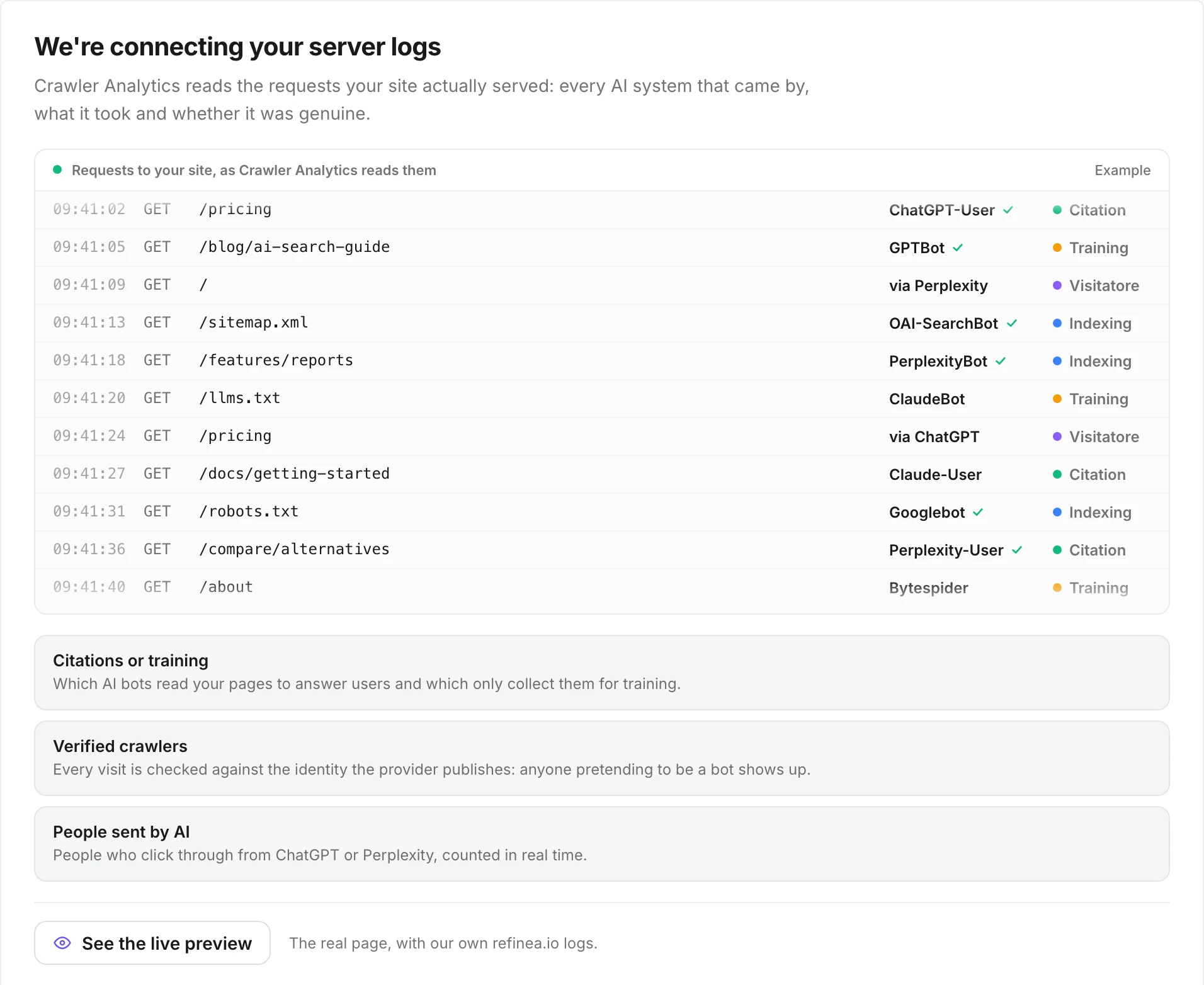
It starts with the first call.
- 1
Google and Bing
You connect Search Console, Analytics and Bing Webmaster Tools together with us.
- 2
The logs
Pick where your site runs and install the crawler connection.
- 3
The CMS
Connect WordPress, Webflow or GitHub when you want the work to arrive as a draft or a pull request.
“With Refinea we’re making WeHunt’s expertise more visible in AI answers too. Over the work we’ve done together, visits from AI assistants have grown by 121%.”
 Davide FagnaniMarketing at WeHunt

Put agents to work on everything AI reads about you.
With Pro, we set up Refinea with you on day one. Agents prepare the work, and your team approves it before anything goes out.
Want to see how AI engines see you today first? Get the free analysis.
Frequently asked questions about integrations
What do you read from Search Console?
Queries and the pages they land on. We use them to choose the questions to ask AI engines.
I don't have access to Search Console. Can I still get started?
Yes. Upload the file Search Console exports (ZIP, CSV or Excel) and connect the account later: from then on, the data arrives in real time.
Can Refinea change my site?
On WordPress it only writes the articles you publish from Refinea. On Webflow it works in the Collections you connect. On GitHub it only opens pull requests: it never writes to the main branch. You can revoke access anytime, from Refinea or from the service.
My site isn't on WordPress, Webflow or GitHub.
The work arrives ready to paste.
Which AI assistants can I connect?
Claude and the other assistants that accept an MCP connector: add https://api.refinea.io/mcp as a custom connector.
Do you have an API?
Yes, on the Pro plan, together with the MCP connector. The documentation is in the app.
Can I bring the data into Looker Studio or BigQuery?
Yes. Visibility, Share of Voice and citations reach your Looker Studio reports and your BigQuery project, and every table exports to Excel or CSV.
My site isn't on Cloudflare, WordPress, Vercel or Webflow.
Let us know from the app which host you use, and we'll tell you how to connect your logs.