
Write what you need. Ref builds the agent
Ref is the assistant inside Refinea: it reads your brand's visibility, citations, Actions and Refinea Brain and answers with your numbers. When a job needs repeating, it asks the questions that change the result and builds the agent on the canvas.
Want to see how AI engines see you today first? Get the free analysis.
Every Monday, write or rework the nike.com/it pages on the running and trail topics where Nike appears in fewer AI answers, starting from the monitored prompts rather than a product list.
Every Monday at 7:00 AM, on the Running shoes subtopics that lost more than 5 points of visibility in the last week.
The Trail running, Road running and Marathon shoes subtopics, with their monitored prompts in Italian. Three pages a week at most.
- The subtopic (picked from the prompts losing visibility, not typed by hand)
- The nike.com/it page that already covers it, if there is one
- The tone of voice and banned words from the Nike Brand Kit
- Reads the subtopic's monitored prompts and which answers name Nike
- Collects the pages the models cite instead of ours (guides, reviews, threads)
- Decides whether to rework an existing page or write a new one, without duplicating the ones already there
- Prepares the outline and stops until a person approves it
- Writes the page with verifiable data (drop, weight, tread) and generates the structured data
- The finished page, split into chapters, as a draft on the Nike Journal
- The Article and FAQPage JSON-LD to paste in
- The list of sources cited today instead of us, with the link to Citation Outreach
- No prices in the text: they change faster than we publish
- No direct comparisons with a competitor by name
- Nothing is published until the outline is approved
 Refined Marketers












 survey of the tools Italian SEO experts use (2026)
 ·Participant in TEF Ignition by
 ·Finalist at

Knows your data
Your domain's visibility, competitors, citations, sentiment and Actions, with traffic from Search Console, Bing Webmaster Tools and Google Analytics and your server logs.
Asks before it acts
Before building, it asks what it can't guess, with ready-made answers to pick from.
Builds the agent
The plan becomes a node-based agent that you open on the canvas and run whenever you want.
It proposes, you apply
Every change it prepares stays a proposal until you apply it.
An assistant that works on your brand's data.
Write to it the way you'd write to a colleague who knows the numbers. It answers with what it read and tells you where it read it.
Ask which prompts and which engines you're weakest on: Ref reads the monitoring data, the traffic from Search Console, Bing Webmaster Tools and Google Analytics and the server logs, and answers topic by topic.
 ChatGPT 50%,
 AI Overview 41.7%
 Gemini and
 Perplexity 33.3%
Every Action has “Ask Ref”: the chat already knows the problem, the cause, the steps and the deliverables.
 Get cited off your siteCitation OutreachOpenWrite the new pageCreate ArticleOpenWork on the pageStructured Data GeneratorOpen
Before building, Ref asks what it can't guess. Answer with one click or in your own words.
If the page already exists, what should the agent do?
Before building you see everything: objective, when it runs, inputs it needs, what it does, what you get, constraints.
Every Monday, write or rework the nike.com/it pages on the running and trail topics where Nike appears in fewer AI answers, starting from the monitored prompts rather than a product list.
Every Monday at 7:00 AM, on the Running shoes subtopics that lost more than 5 points of visibility in the last week.
The Trail running, Road running and Marathon shoes subtopics, with their monitored prompts in Italian. Three pages a week at most.
- The subtopic (picked from the prompts losing visibility, not typed by hand)
- The nike.com/it page that already covers it, if there is one
- The tone of voice and banned words from the Nike Brand Kit
- Reads the subtopic's monitored prompts and which answers name Nike
- Collects the pages the models cite instead of ours (guides, reviews, threads)
- Decides whether to rework an existing page or write a new one, without duplicating the ones already there
- Prepares the outline and stops until a person approves it
- Writes the page with verifiable data (drop, weight, tread) and generates the structured data
- The finished page, split into chapters, as a draft on the Nike Journal
- The Article and FAQPage JSON-LD to paste in
- The list of sources cited today instead of us, with the link to Citation Outreach
- No prices in the text: they change faster than we publish
- No direct comparisons with a competitor by name
- Nothing is published until the outline is approved
Ref prepares changes to the monitored prompts, topics, competitors or schedules. You apply or dismiss them.
- +Trail shoes for wide feet
- +Waterproof trail shoes for winter
- +How many kilometers does a trail running shoe last?
Pick the model and how much it should reason, from simple tasks to agentic work.
From chat to an agent that works every week.
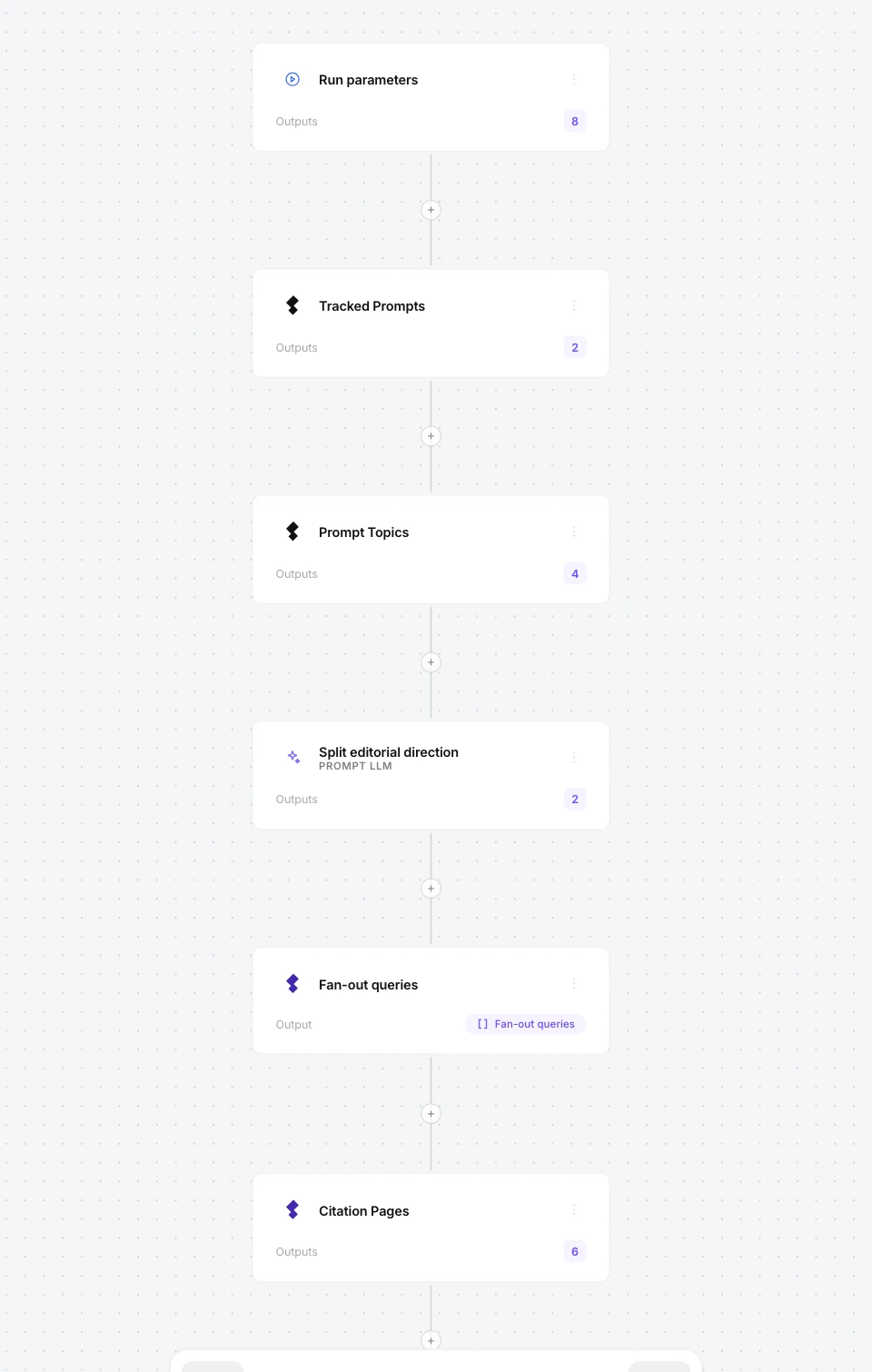
When you're happy with the plan, Ref builds the agent node by node. You open it on the canvas, run it whenever you want or put it on a schedule.
 Create Article · Nike Running
One click to build
Click “Build the agent” on the plan, then “Open the agent” to find it on the canvas.
Every node in view
Parameters, monitored prompts, topics, cited pages: you see where each step starts from.
Edit it in plain words
Ask Ref to change something and it updates the same agent instead of creating a new one.
Ref also helps when an agent is waiting for your yes.
Before writing an article, the agent prepares the outline and stops until you approve it. Ref reads it with you, prepares the revised version and, on your OK, the agent writes the article.
- +H3 · Outsole and lugs for muddy terrain
Open with the question that decides everything else: packed trail, mud, rock or a mix. A table of terrain → outsole → example use, without naming the models yet.
Lug height and spacing, rubber compound, what happens in the wet. Answer “how to choose the outsole for mud” directly.
How much cushioning, and why the descent matters more than the climb. Separate protection (plate, midsole) from comfort; one paragraph for people who run long descents.
When weight matters (races under 20 km, vertical) and when it doesn't. Give an order of magnitude in grams, stated as such.
Pros and cons of the membrane, when water gets in through the ankle anyway, what to choose for snow and rain.
Reads what's waiting
The article's outline, with title, meta description and sections, before the agent writes it.
Proposes the revised version
With your changes, which you accept or edit again.
Resumes on your OK
You approve, and the agent writes the article from the revised outline.
“With Refinea we’re making WeHunt’s expertise more visible in AI answers too. Over the work we’ve done together, visits from AI assistants have grown by 121%.”
 Davide FagnaniMarketing at WeHunt

Put agents to work on everything AI reads about you.
With Pro, we set up Refinea with you on day one. Agents prepare the work, and your team approves it before anything goes out.
Want to see how AI engines see you today first? Get the free analysis.
Frequently asked questions about Ref
What is Ref?
It's the assistant inside Refinea. It answers your questions with your domain's data and, when a job needs repeating, builds the agent that does it.
What data does it read?
Your domain's visibility, competitors, citations, prompts, sentiment, Actions and Refinea Brain; traffic from Search Console, Bing Webmaster Tools and Google Analytics; the server logs with AI crawler visits; plus your site's pages and Refinea's documentation. You can also limit it to the documentation alone.
Can it change anything without my OK?
No. Every change it prepares is a proposal: nothing changes until you apply it.
What agents can it build?
The ones you need: Ref starts from your request, asks what's missing and builds the node-based agent, with the same building blocks as the agents in the library. You can run it by hand or on a schedule.
Which model does it use?
The one you choose. With “Auto” it uses the recommended model, and you decide how much it should reason.
How do I check what it says?
Every answer shows which data Ref read to give it, and every change waits for your OK.
What language does it answer in?
Whichever language you write in.